Update: PART 2
FLOW IS A STATIC TYPE CHECKER FOR JAVASCRIPT.
I like to install flow wherever I go
Funnily enough (at the time of writing this post) I’m checked out on a branch titled add-flow. When I get started on a project, I usually make a PR to install flow. Here’s the few quick steps I manually go through (and open to suggestions about how to automate this!):
- In terminal, in the project root directory:
npm install --save-dev flow-bin-
In
package.json, inside"scripts": { ...- add
"flow": "flow",
- add
-
Run
npm run flow initnpm run flow
Then I commit the changes, push my branch, and open the PR!
Why?
I’m not exactly sure when I even discovered @flow, but I think it was because of some hot buzzwords like, facebook, open-source, and type-checking. I easily succumb to F.O.M.O. I’m a naturally curious person, so I just decided to check it out.
Autocomplete & Type-Hinting
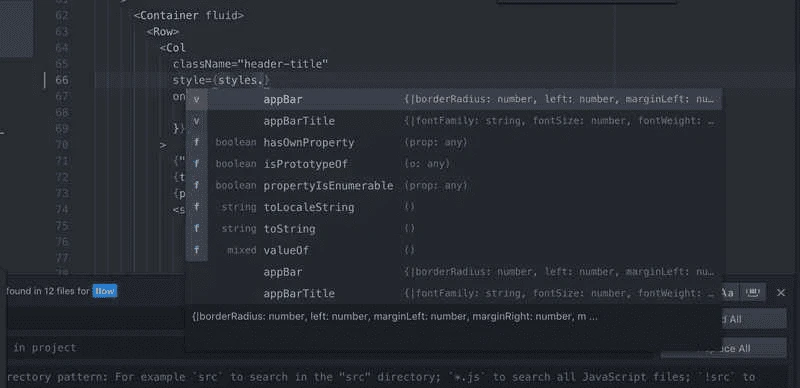
I enjoy atom as my text-editor (maybe I’ll write about atom in another post 🤔), and as far as I’ve noticed, flow enables some nice Autocomplete & Type-Hinting popups when you’re working.
So let’s say I have a const styles = { ...some properties in here } defined. As I’m typing out styles., I get this nice popup that displays the all the existing properties, and then some methods that can be called as well.
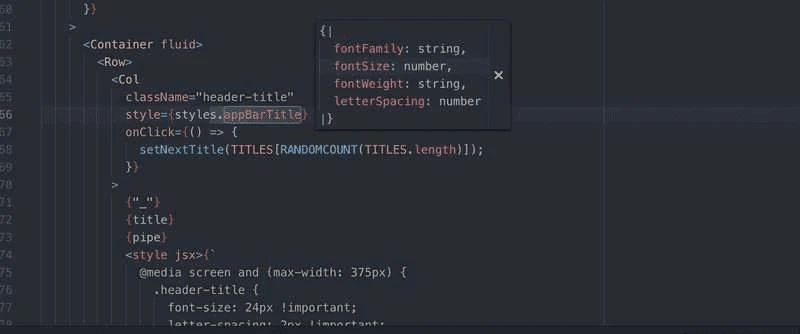
And when I go to hover over some bits of my code, I also get some nice type-annotation previews. (Please correct me if this is the wrong terminology.)
There’s more…
But I’m trying to juggle writing in between three phone interviews today, and it’s proving to be quite a struggle, so I’ll leave this post short and sweet.
TODOs
- Phone interview with TrilogyEd @ 2:30
- Write about what happens when you add
// @flowat the top of a.jsfile. - Write about my discoveries with type annotation & object destructuring
- Phone interview with Scoot Networks @ 4:00
- Phone interview with Sig.ma @ 5:30
- Go to climbing gym
